Self-Healing Rollouts: Automating Production Fixes with Agentic AI and Argo Rollouts

Rolling out changes to all users at once in production is risky—we’ve all learned this lesson at some point. But what if we could combine progressive delivery techniques with AI agents to automatically detect, analyze, and fix deployment issues? In this article, I’ll show you how to implement self-healing rollouts using Argo Rollouts and agentic AI to create a fully automated feedback loop that can fix production issues while you grab a coffee.

The Case for Progressive Delivery

Progressive Delivery is a term that encompasses deployment strategies designed to avoid the pitfalls of all-or-nothing deployments. The concept gained significant attention after the CrowdStrike incident, where a faulty update took down a substantial portion of the internet. Their post-mortem revealed a crucial lesson: they should have deployed to progressive “rings” or “waves” of customers, with time between deployments to gather metrics and telemetry.

The key principles of progressive delivery are:

  • Avoiding downtime: Deploy changes gradually with quick rollback capabilities
  • Limiting the blast radius: Only a small percentage of users are affected if something goes wrong
  • Shorter time to production: Safety nets enable faster, more confident deployments

As I like to say: “If you haven’t automatically destroyed something by mistake, you’re not automating enough.”

Progressive Delivery Techniques

Rolling Updates

Kubernetes provides rolling updates by default. As new pods come up, old pods are gradually deleted, automatically shifting traffic to the new version. If issues arise, you can roll back quickly, affecting only the percentage of traffic that hit the new pods during the update window.

Blue-Green Deployment

This technique involves deploying a complete copy of your application (the “blue” version) alongside the existing production version (the “green” version). After testing, you switch all traffic to the new version. While this provides quick rollbacks, it requires twice the resources and switches all traffic at once, potentially affecting all users before you can react.

Canary Deployment

Canary deployments offer more granular control. You deploy a new version alongside the stable version and gradually increase the percentage of traffic going to the new version—perhaps starting with 5%, then 10%, and so on. You can route traffic based on various parameters: internal employees, IP ranges, or random percentages. This approach allows you to detect issues early while minimizing user impact.

Feature Flags

Feature flags provide even more granular control at the application level. You can deploy code with new features disabled by default, then enable them selectively for specific user groups. This decouples deployment from feature activation, allowing you to:

  • Ship faster without immediate risk
  • Enable features for specific customers or user segments
  • Quickly disable problematic features without redeployment

You can implement feature flags using dedicated services like OpenFeature or simpler approaches like environment variables.

Progressive Delivery in Kubernetes

Kubernetes provides two main architectures for traffic routing:

Service Architecture

The traditional approach uses load balancers directing traffic to services, which then route to pods based on labels. This works well for basic scenarios but lacks flexibility for advanced routing.

Ingress Architecture

The Ingress layer provides more sophisticated traffic management. You can route traffic based on domains, paths, headers, and other criteria, enabling fine-grained control essential for canary deployments. Popular ingress controllers include:

Enter Argo Rollouts

Argo Rollouts is a Kubernetes controller that provides advanced deployment capabilities including blue-green deployments, canary releases, analysis, and experimentation. It’s a powerful tool for implementing progressive delivery in Kubernetes environments.

How Argo Rollouts Works

The architecture includes:

  1. Rollout Controller: Manages the deployment process
  2. Rollout Object: Defines the deployment strategy and analysis configuration
  3. Analysis Templates: Specify metrics and success criteria
  4. Replica Sets: Manages stable and canary versions with automatic traffic shifting

When you update a Rollout, it creates separate replica sets for stable and canary versions, gradually increasing canary pods while decreasing stable pods based on your defined rules. If you’re using a service mesh or advanced ingress, you can implement fine-grained routing—sending specific headers, paths, or user segments to the canary version.

Analysis Options

Argo Rollouts supports various analysis methods:

  • Prometheus: Query metrics to determine rollout health
  • Datadog: Integration with Datadog monitoring
  • Kubernetes Jobs: Run custom analysis logic—check databases, call APIs, or perform any custom validation

The experimentation feature is particularly interesting. We considered using it to test Java upgrades: deploy a new Java version, run it for a few hours gathering metrics on response times and latency, then decide whether to proceed with the full rollout—all before affecting real users.

Adding AI to the Mix

Now, here’s where it gets interesting: what if we use AI to analyze logs and automatically make rollout decisions?

The AI-Powered Analysis Plugin

I developed a plugin for Argo Rollouts that uses Large Language Models (specifically Google’s Gemini) to analyze deployment logs and make intelligent decisions about whether to promote or rollback a deployment. The workflow is:

  1. Log Collection: Gather logs from stable and canary versions
  2. AI Analysis: Send logs to an LLM with a structured prompt
  3. Decision Making: The AI responds with a promote/rollback recommendation and confidence level
  4. Automated Action: Argo Rollouts automatically promotes or rolls back based on the AI’s decision

The prompt asks the LLM to:

  • Analyze canary behavior compared to the stable version
  • Respond in JSON format with a boolean promotion decision
  • Provide a confidence level (0-100%)

For example, if the confidence threshold is set to 50%, any recommendation with confidence above 50% is executed automatically.

The Complete Self-Healing Loop

But we can go further. When a rollout fails and rolls back, the plugin automatically:

  1. Creates a GitHub Issue: The LLM generates an appropriate title and detailed description of the problem, including log analysis and recommended fixes
  2. Assigns a Coding Agent: Labels the issue to trigger agents like JulesGitHub Copilot, or similar tools
  3. Automatic Fix: The coding agent analyzes the issue, creates a fix, and submits a pull request
  4. Continuous Loop: Once merged, the new version goes through the same rollout process

Live Demo Results

In my live demonstration, I showed this complete workflow in action:

Successful Deployment: When deploying a working version (changing from “blue” to “green”), the rollout progressed smoothly through the defined steps (20%, 40%, 60%, 80%, 100%) at 10-second intervals. The AI analyzed the logs and determined: “The stable version consistently returns 100 blue, the canary version returns 100 green, both versions return 200 status codes. Based on the logs, the canary version seems stable.”

Failed Deployment: When deploying a broken version that returned random colors and threw panic errors, the system:

  • Detected the issue during the canary phase
  • Automatically rolled back to the stable version
  • The AI analysis identified: “The canary version returns a mix of colors (purple, blue, green, orange, yellow) along with several panic errors due to runtime error index out of range with length zero”
  • Provided a confidence level of 95% that the deployment should not be promoted
  • Automatically created a GitHub issue with detailed analysis
  • Assigned the issue to Jules (coding agent)
  • Within 3-5 minutes, received a pull request with a fix

The coding agents (I demonstrated both Jules and GitHub Copilot) analyzed the code, identified the problem in the getColor() function, fixed the bug, added tests, and created well-documented pull requests with proper commit messages.

Technical Implementation

The Rollout Configuration

apiVersion: argoproj.io/v1alpha1
kind: Rollout
metadata:
  name: canary-demo
spec:
  strategy:
    canary:
      analysis:
        templates:
          - templateName: canary-analysis-ai

The Analysis Template

The template configures the AI plugin to check every 10 seconds and require a confidence level above 50% for promotion:

apiVersion: argoproj.io/v1alpha1
kind: AnalysisTemplate
metadata:
  name: canary-analysis-ai
spec:
  metrics:
    - name: success-rate
      interval: 10s
      successCondition: result > 0.50
      provider:
        plugin:
          argoproj-labs/metric-ai:
            model: gemini-2.0-flash
            githubUrl: https://github.com/carlossg/rollouts-demo
            extraPrompt: |
              Ignore color changes.

Agent-to-Agent Communication

The plugin supports two modes:

  1. Inline Mode: The plugin directly calls the LLM, makes decisions, and creates GitHub issues
  2. Agent Mode: Uses agent-to-agent (A2A) communication to call specialized agents with domain-specific knowledge and tools

The native mode is particularly powerful because you can build agents that understand your specific problem space, with access to internal databases, monitoring tools, or other specialized resources.

The Future of Self-Healing Systems

This approach demonstrates the practical application of AI agents in production environments. The key insight is creating a continuous feedback loop:

  1. Deploy changes progressively
  2. Automatically detect issues
  3. Roll back when necessary
  4. Generate detailed issue reports
  5. Let AI agents propose fixes
  6. Review and merge fixes
  7. Repeat

The beauty of this system is that it works continuously. You can have multiple issues being addressed simultaneously by different agents, working 24/7 to keep your systems healthy. As humans, we just need to review and ensure the proposed fixes align with our intentions.

Practical Considerations

While this technology is impressive, it’s important to note:

  • AI isn’t perfect: The agents don’t always get it right on the first try (as demonstrated when the AI ignored my instruction about color variations)
  • Human oversight is still crucial: Review pull requests before merging
  • Start simple: Begin with basic metrics before adding AI analysis
  • Tune your confidence thresholds: Adjust based on your risk tolerance
  • Monitor the monitors: Ensure your analysis systems are reliable

Getting Started

If you want to implement similar systems:

  1. Start with Argo Rollouts: Learn basic canary deployments without AI
  2. Implement analysis: Use Prometheus or custom jobs for analysis
  3. Add AI gradually: Experiment with AI analysis for non-critical deployments
  4. Build the feedback loop: Integrate issue creation and coding agents
  5. Iterate and improve: Refine your prompts and confidence thresholds

Conclusion

Progressive delivery isn’t new, but combining it with agentic AI creates powerful new possibilities for self-healing systems. While we’re not at full autonomous production management yet, we’re getting closer. The technology exists today to automatically detect, analyze, and fix many production issues without human intervention.

As I showed in the demo, you can literally watch the system detect a problem, roll back automatically, create an issue, and have a fix ready for review—all while you’re having coffee. That’s the future I want to work toward: systems that heal themselves and learn from their mistakes.

Resources

Serverless CI/CD with AWS ECS Fargate

Amazon AWS has recently launched ECS Fargate to “run containers without having to manage servers or clusters”.

So this got me interested enough to patch the Jenkins ECS plugin to run Jenkins agents as containers using Fargate model instead of the previous model where you would still need to create and manage VM instances to run the containers.

How does it work?

With the Jenkins ECS plugin you can configure a “Cloud” item that will launch all your agents on ECS Fargate, matching jobs to different container templates using labels. This means you can have unlimited agents with no machines to manage and just pay for what you use.

Some tips on the configuration:

  • Some options need to be configured, like subnet, security group and assign a public ip to the container in order to launch in Fargate.
  • Agents need to adhere to some predefined cpu and memory configurations. For instance for 1 vCPU you can only use 2GB to 8GB in 1GB increments.

Pricing

Price per vCPU is $0.00001406 per second ($0.0506 per hour) and per GB memory is $0.00000353 per second ($0.0127 per hour).

If you compare the price with a m5.large instance (4 vCPU, 16 GB) that costs $0.192 per hour, it would cost you $0,4056 in Fargate, more than twice, ouch! You could build something similar and cheaper with Kubernetes using the cluster autoscaler given you can achieve a high utilization of the machines.

While I was writing this post someone already beat me to submit a PR to the ECS plugin to add the Fargate support.

Speaking Trips on DevOps, Kubernetes, Jenkins

This 2nd half of the year speaking season is starting and you’ll find me speaking about DevOps, Kubernetes, Jenkins,… at

If you organize a conference and would like me to give a talk in 2018 you can find me @csanchez.

Screen Shot 2017-08-24 at 17.07.45.png

Next Events: DevOpsPro Vilnius, MesosCon, Boulder JAM & Docker meetups, Open DevOps Milan

I’ll be traveling in the following weeks, speaking at

DevOpsPro in Vilnius, Lithuania: From Monolith to Docker Distributed Applications (May 26th)

MesosCon North America in Denver, CO: CI and CD at Scale: Scaling Jenkins with Docker and Apache Mesos (June 1st)

Jenkins Area Meetup and Docker Boulder meetup in Boulder, CO: CI and CD at Scale: Scaling Jenkins with Docker and Apache Mesos (June 2nd)

Open DevOps in Milan, Italy: Continuous Delivery and the DevOps Way (June 22nd)

If you are around just ping me!

Downloading artifacts from a Maven repository with Ansible

AnsibleLogoAn example of downloading artifacts from a Maven repository using Ansible, including a prebuilt Docker image.

Prerequisites

Install JDK and Maven using existing Ansible modules

ansible-galaxy install geerlingguy.java
ansible-galaxy install https://github.com/silpion/ansible-maven.git
- hosts: localhost

 roles:
 - { role: ansible-maven }
 - { role: geerlingguy.java }

 vars:
 java_packages:
 - java-1.7.0-openjdk

Example

From mvn.yml, download any number of Maven artifacts optionally from different repositories

- hosts: localhost

 vars:
 mvn_artifacts:
 - id: org.apache.maven:maven-core:2.2.1:jar:sources
 dest: /tmp/test.jar
 # params: -U # update snapshots
 # repos:
 # - http://repo1.maven.apache.org/maven2
 
 tasks:
 - name: copy maven artifacts
 command: mvn {{ item.params | default('') }} org.apache.maven.plugins:maven-dependency-plugin:get -Dartifact={{ item.id }} -Ddest={{ item.dest }} -Dtransitive=false -Pansible-maven -DremoteRepositories={{ item.repos | default(['http://repo1.maven.apache.org/maven2']) | join(",") }}
 with_items: mvn_artifacts

Docker

An image with Ansible, JDK and Maven preinstalled is available at csanchez/ansible-maven.

Scaling Docker with Kubernetes

kubernetesI have published a new article on InfoQ, Scaling Docker with Kubernetes, where I describe the Kubernetes project and how it allows to run Docker containers across multiple hosts.

Kubernetes is an open source project to manage a cluster of Linux containers as a single system, managing and running Docker containers across multiple hosts, offering co-location of containers, service discovery and replication control.

Included in the article there is an example of scaling Jenkins in a master – multiple slaves architecture, where the slaves are running in Kubernetes. When I finally find the time I will implement a Jenkins Kubernetes plugin that would handle the scaling automatically.

Continuous Discussion panel about Agile, Continuous Delivery, DevOps

electriccloudLast week I participated as a panelist in the Continuous Discussions talk hosted by Electric Cloud, and the recording is now available. A bit long but there are some good points in there.
Some excerpts from twitter

@csanchez: “How fast can your tests absorb your debs agility” < and your Ops, and your Infra?

@cobiacomm: @orfjackal says ‘hard to do agile when the customer plan is to release once per year’

@sunandaj17: It’s not just about the tools: is a matter of team policies & conventions) & it relies on more than 1 kind of tool

@eriksencosta: “You can’t outsource Agile”.

@cobiacomm: biggest agile obstacles -> long regression testing cycles, unclear dependencies, and rebuilding the wheel

The panelists:

Andrew Rivers – blog.andrewrivers.co.uk
Carlos Sanchez – @csanchez   |  http://csanchez.org
Chris Haddad – @cobiacomm
Dave Josephsen – @djosephsen
Eriksen Costa – @eriksencosta  |  blog.eriksen.com.br
Esko Luontola – @orfjackal  |  www.orfjackal.net
John Ryding – @strife25  |  blog.johnryding.com
Norm MacLennan – @nromdotcom  |  blog.normmaclennan.com
J. Randall Hunt – @jrhunt  |  blog.ranman.org
Sriram Narayan – @sriramnarayan  |  www.sriramnarayan.com
Sunanda Jayanth – @sunandaj17  |  http://blog.qruizelabs.com/

Hosts: Sam Fell (@samueldfell) and Anders Wallgren (@anders_wallgren) from Electric Cloud.

http://electric-cloud.com/blog/2014/10/c9d9-continuous-discussions-episode-1-recap/

Building Docker images with Puppet

Docker-logoEverybody should be building Docker images! but what if you don’t want to write all those shell scripts, which is basically what the Dockerfile is, a bunch of shell commands in RUN declarations; or if you are already using some Puppet modules to build VMs?

It is easy enough to build a new Docker image from Puppet manifests. For instance I have built this Jenkis slave Docker image, so here are the steps.

The Devops Israel team has built a number of Docker images on CentOS with Puppet preinstalled, so that is a good start.


FROM devopsil/puppet:3.5.1

Otherwise you can just install Puppet in any bare image using the normal installation instructions. Something to have into account is that Docker images are quite simple and may not have some needed packages installed. In this case the centos6 image didn’t have tar installed and some things failed to run. In some CentOS images the centosplus repo needs to be enabled for the installation to succeed.


FROM centos:centos6
RUN rpm --import https://yum.puppetlabs.com/RPM-GPG-KEY-puppetlabs && \
    rpm -ivh http://yum.puppetlabs.com/puppetlabs-release-el-6.noarch.rpm

# Need to enable centosplus for the image libselinux issue
RUN yum install -y yum-utils
RUN yum-config-manager --enable centosplus

RUN yum install -y puppet tar

Once Puppet is installed we can apply any manifest to the server, we just need to put the right files in the right places. If we need extra modules we can copy them from the host, maybe using librarian-puppet to manage them. Note that I’m avoiding to run librarian or any tool in the image, as that would require installing extra packages that may not be needed at runtime.


ADD modules/ /etc/puppet/modules/

The main manifest can go anywhere but the default place is into /etc/puppet/manifests/site.pp. Hiera data default configuration goes into /var/lib/hiera/common.yaml.


ADD site.pp /etc/puppet/manifests/
ADD common.yaml /var/lib/hiera/common.yaml

Then we can just run puppet apply and check that no errors happened


RUN puppet apply /etc/puppet/manifests/site.pp --verbose --detailed-exitcodes || [ $? -eq 2 ]

After that it’s the usual Docker CMD configuration. In this case we call Jenkins slave jar from a shell script that handles some environment variables, with information about the Jenkins master, so it can be overriden at runtime with docker run -e.


ADD cmd.sh /cmd.sh

#ENV JENKINS_USERNAME jenkins
#ENV JENKINS_PASSWORD jenkins
#ENV JENKINS_MASTER http://jenkins:8080

CMD su jenkins-slave -c '/bin/sh /cmd.sh'

The Puppet configuration is simple enough

node 'default' {
  package { 'wget':
    ensure => present
  } ->
  class { '::jenkins::slave': }
}

and Hiera customizations, using a patched Jenkins module for this to work.


# Jenkins slave
jenkins::slave::ensure: stopped
jenkins::slave::enable: false

And that’s all, you can see the full source code at GitHub. If you are into Docker check out this IBM research paper comparing virtual machines (KVM) and Linux containers (Docker) performance.

Using Puppet’s metadata.json in Librarian-Puppet and Blacksmith

I have published new versions of librarian-puppet and puppet-blacksmith gems that handle the new Puppet metadata.json format for module data and dependencies.

Puppet Labs logolibrarian-puppet 1.3.1 and 1.0.8 [changelog] include two important changes. Now there is no need to create a Puppetfile if you have a Modulefile or metadata.json, it will use them by default. Of course you can add a Puppetfile to bring in modules from git, a directory, or github tarballs.

The other change is that all the dependencies’ metadata.json files will be parsed now for transitive dependencies, so it works with the latest Puppet Labs modules and those migrated from the old Modulefile format going forward. That also means that the puppet gem is no longer needed if there are no Modulefile present in your tree of dependencies, which was a source of pain for some users.

The 1.0.x branch is kept updated to run in Ruby 1.8 while 1.1+ requires Ruby 1.9 and uses the Puppet Forge API v3.

Puppet Blacksmith, the gem to automate pushing modules to the Puppet Forge was also updated to use metadata.json besides Modulefile in version 2.2+ [changelog].

Anatomy of a DevOps Orchestration Engine: (III) Agents

MaestroDev logoPreviously: (II) Architecture

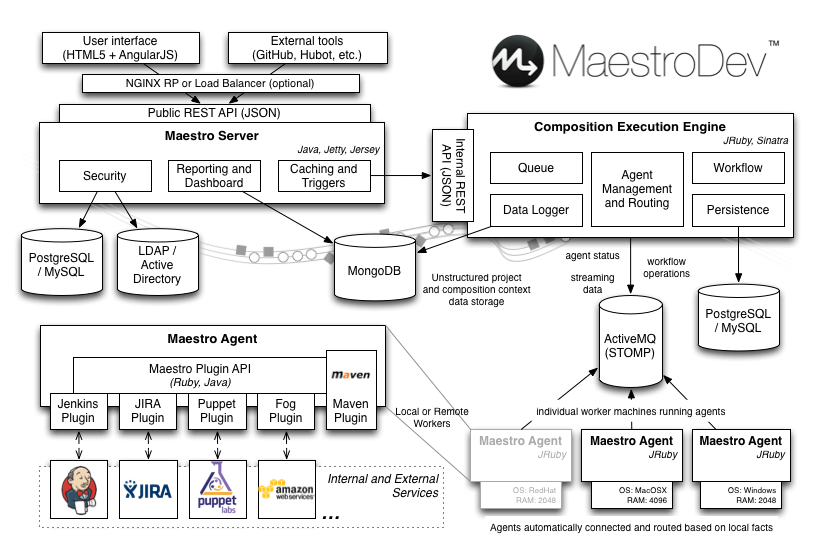
In Maestro we typically use a Maestro master server and multiple Maestro agents. Each Maestro Agent is just a small service where the actual work happens, it processes the work sent by the master, via ActiveMQ, and executes the plugins with the data received.

Architecture

The two main goals of the agent are load distribution and heterogeneous composition support. The more agents running, the more compositions that can be executed in parallel, and compositions can target specific agents based on its features, such as architecture, operating system,… which is a must for development environments. For simplicity each agent can only run one composition at a time, but you could have multiple agent processes running in a single server.

It uses Puppet Facter to gather the machine facts (operating system, memory size, cloud provider data,…) and sends all that information to the master, that can use it to filter what compositions run in the agent. For instance I may want to run a composition in a Windows agent, or in an agent that has some specific piece of software installed. Facter supports external facts so it is really easy to add new filtering capabilities, and not be just limited to what Facter provides out of the box. A small text file can be added to /etc/facter/facts.d/ and Facter would report it to the master server.

Agents are installed alongside with all the tools that may be needed, from Git, to clone repos, to Jenkins swarm to reuse the agents as Jenkins slaves, or mcollective agents to allow updating the agent itself automatically with Puppet when new manifests are deployed to the Puppet master. In our internal environment any commit to Puppet manifests or modules automatically trigger our rspec-puppet tests, the deployment of those manifests to the Puppet master, and a cascading Puppet update of all the machines in our staging environment using MCollective. All our Puppet modules are likewise built and tested on each commit and a new version published to the Puppet Forge automatically using rspec-puppet and Puppet Blacksmith.

Maestro also supports manually assigning agents to pools, and matching compositions with agent pools, so compositions can be limited to run in a predefined set of agents.

The agent process is written in Ruby and runs under JRuby in the JVM, thus supporting multiple operating systems and architectures, and the ability to write extensions in Java or Ruby easily. It connects to the master’s Composition Execution Engine through ActiveMQ using STOMP for messaging.

Plugins

Plugins are small pieces of code written in Java or Ruby that run in the agent to execute the actual work. We have made all plugins available in GitHub so they can be used as examples to create new plugins for custom tasks.

Plugins can be added to Maestro at runtime and automatically show up in the composition editor. The plugin manifest defines the plugin images, what tasks are defined, and what fields in each task. Based on the workload received, the agent downloads and executes the plugin, which just accesses the fields in the workload and do the actual work, whatever it might be, sending output back to LuCEE and populating the composition context.

For instance the Fog plugin can manage multiple clouds, such as EC2, where it can start and stop instances. The plugin receives the fields defined in the composition (credentials, image id,…), calls the EC2 API, streams the status to the Maestro output (successfully created, instance id,…) and puts some data (ids of the instances created, public ips,…) in the composition context for other tasks to use. All of that in less than 100 lines of code.

The context is important to avoid redefining field values and provide some meaningful defaults, so if you have a provision task and a deprovision task, the values in the the latter are inherited from the former.

Agent cloud manager

The agent cloud manager is a service that runs on Google Compute Engine and watches a number of Maestro installations to provide automatic agent scaling. Based on preconfigured parameters such as min/max number of agents for each agent pool, max waiting time,… and the current status of each agent pool queue, the service can start new machines from specific images, suspend them (destroy the instance but keep the disk), or completely destroy them.

We are also giving a try to Docker instead of using full vms and have created a couple interesting Docker images on CentOS for developers, a Jenkins swarm slave image and a build agent image that includes everything we use at development: Java, Ant, Maven, RVM (with 1.9, 2.0, 2.1, JRuby), Git, Svn, all configurable with credentials at runtime.